

Create a W&B Experiment
Create a W&B Experiment in four steps:- Initialize a W&B Run.
- Capture a dictionary of hyperparameters.
- Log metrics inside your training loop.
- Log an artifact to W&B.
Initialize a W&B run
A run is the basic unit of computation tracked by W&B, and every experiment begins by creating one. Usewandb.init() to create a W&B Run.
The following snippet creates a run in a W&B project named "cat-classification" with the description "My first experiment" to help identify this run. The tags "baseline" and "paper1" indicate that this run is a baseline experiment intended for a future paper publication.
wandb.init() returns a Run object.
W&B adds runs to pre-existing projects if that project already exists when you call
wandb.init(). For example, if you already have a project called "cat-classification", that project continues to exist and isn’t deleted. Instead, W&B adds a new run to that project.Capture a dictionary of hyperparameters
Save a dictionary of hyperparameters such as learning rate or model type. The model settings you capture in config are useful later to organize and query your results.Log metrics inside your training loop
Log metrics during training to monitor progress and compare runs in the W&B dashboard. Callrun.log() to log metrics about each training step such as accuracy and loss.
Log an artifact to W&B
Optionally log a W&B Artifact. Artifacts let you version datasets and models.Complete example
The following script combines the previous code snippets into a complete experiment that initializes a run, captures configuration, logs metrics, and saves a model artifact:Next steps: visualize your experiment
After your run completes, the metrics, configuration, and artifacts you logged are available in the W&B App. Use the W&B Dashboard as a central place to organize and visualize results from your machine learning models. With a few clicks, construct interactive charts such as parallel coordinates plots, parameter importance analyses, and additional chart types.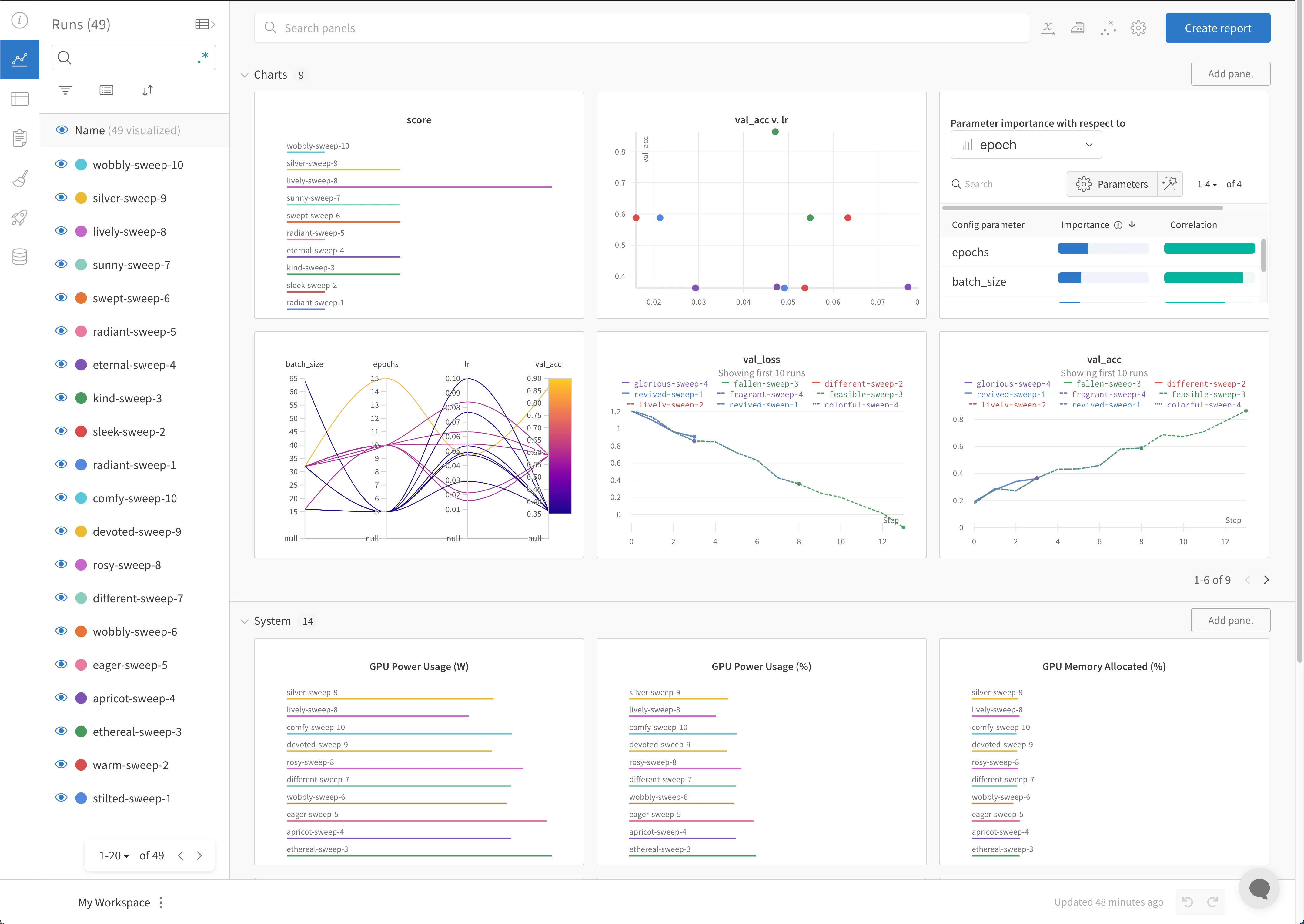
Best practices
The following are some suggested guidelines to consider when you create experiments:- Finish your runs: Use
wandb.init()in awithstatement to automatically mark the run as finished when the code completes or raises an exception.-
In Jupyter notebooks, it might be more convenient to manage the Run object yourself. In this case, you can explicitly call
finish()on the Run object to mark it complete:
-
In Jupyter notebooks, it might be more convenient to manage the Run object yourself. In this case, you can explicitly call
- Config: Track hyperparameters, architecture, dataset, and anything else you’d like to use to reproduce your model. These show up in columns. Use config columns to group, sort, and filter runs dynamically in the app.
- Project: A project is a set of experiments you can compare together. Each project gets a dedicated dashboard page, and you can turn on and off different groups of runs to compare different model versions.
- Notes: Set a quick commit message directly from your script. Edit and access notes in the Overview section of a run in the W&B App.
- Tags: Identify baseline runs and favorite runs. You can filter runs using tags. You can edit tags later on the Overview section of your project’s dashboard on the W&B App.
- Create multiple run sets to compare experiments: When you compare experiments, create multiple run sets to make metrics easy to compare. You can toggle run sets on or off on the same chart or group of charts.
wandb.init() API docs in the API Reference Guide.