Use the W&B Python Library to log a CSV file and visualize it in a W&B Dashboard. W&B Dashboards are the central place to organize and visualize results from your machine learning models. By following this page, you can bring existing CSV data into W&B so you can compare, query, and analyze it alongside other experiments. This is useful if you have a CSV file that contains information about previous machine learning experiments that you didn’t log in W&B, or if you have a CSV file that contains a dataset.

Import and log your dataset CSV file

This section shows how to import a dataset stored in a CSV file, convert it into a W&B Table, and store it in an artifact for reuse across runs. Use W&B artifacts to make the contents of the CSV file easier to reuse.
  1. Import your CSV file. In the following code snippet, replace the iris.csv filename with the name of your CSV file:
import wandb
import pandas as pd

# Read our CSV into a new DataFrame
new_iris_dataframe = pd.read_csv("iris.csv")
  1. Convert the CSV file to a W&B Table to use with W&B Dashboards:
# Convert the DataFrame into a W&B Table
iris_table = wandb.Table(dataframe=new_iris_dataframe)
  1. Create a W&B artifact and add the table to the artifact:
# Add the table to an Artifact to increase the row
# limit to 200000 and make it easier to reuse
iris_table_artifact = wandb.Artifact("iris_artifact", type="dataset")
iris_table_artifact.add(iris_table, "iris_table")

# Log the raw csv file within an artifact to preserve our data
iris_table_artifact.add_file("iris.csv")
For more information about W&B artifacts, see Artifacts.
  1. Start a new W&B run to track and log to W&B with wandb.init():
# Start a W&B run to log data
with wandb.init(project="tables-walkthrough") as run:

    # Log the table to visualize with a run...
    run.log({"iris": iris_table})

    # and Log as an Artifact to increase the available row limit!
    run.log_artifact(iris_table_artifact)
The wandb.init() API spawns a new background process to log data to a run, and it synchronizes data to wandb.ai by default. View live visualizations on your W&B Workspace Dashboard. The following image shows the output of the previous code snippet.
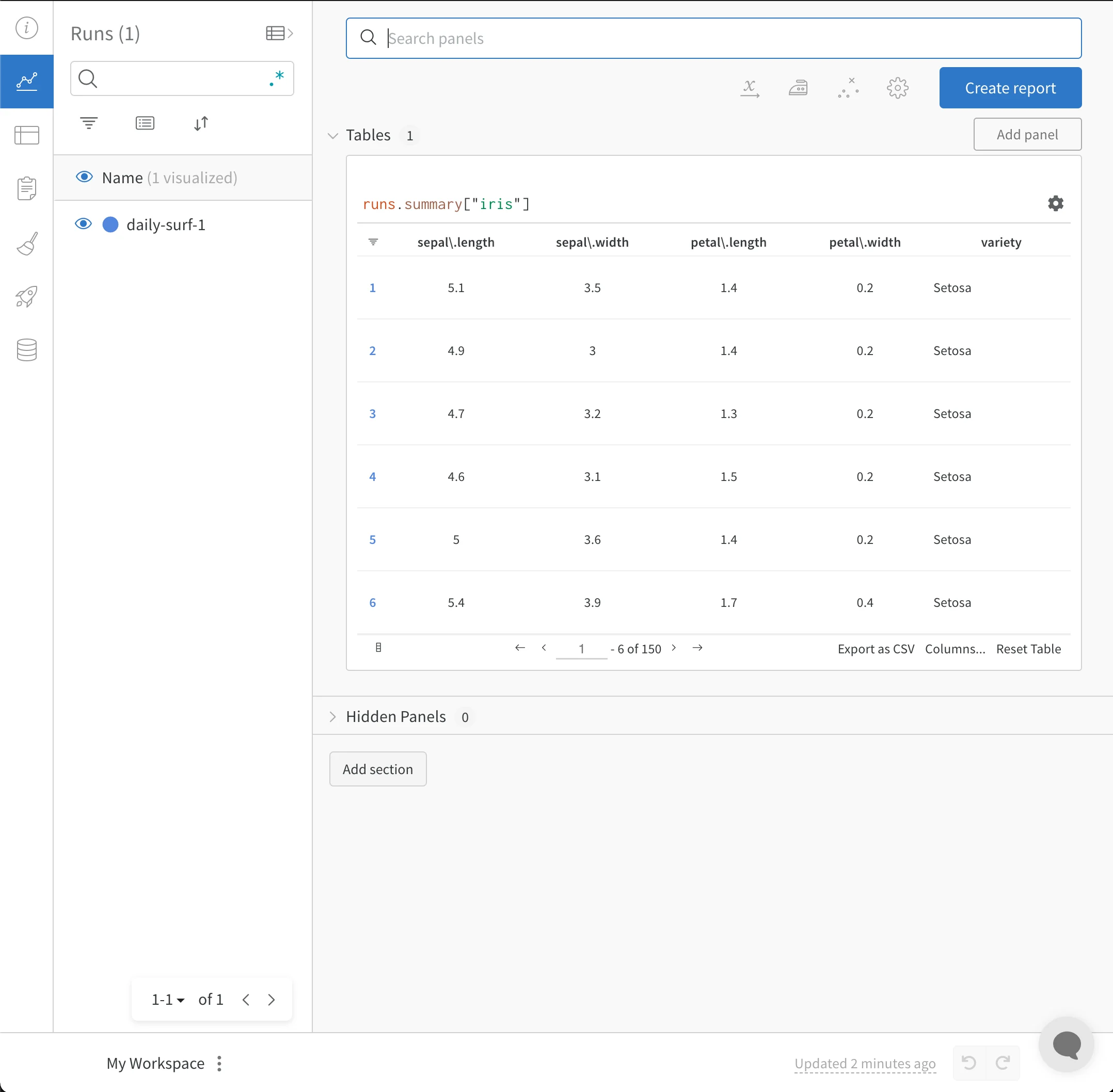
CSV file imported into W&B Dashboard
The full script with the previous code snippets follows:
import wandb
import pandas as pd

# Read our CSV into a new DataFrame
new_iris_dataframe = pd.read_csv("iris.csv")

# Convert the DataFrame into a W&B Table
iris_table = wandb.Table(dataframe=new_iris_dataframe)

# Add the table to an Artifact to increase the row
# limit to 200000 and make it easier to reuse
iris_table_artifact = wandb.Artifact("iris_artifact", type="dataset")
iris_table_artifact.add(iris_table, "iris_table")

# Log the raw csv file within an artifact to preserve our data
iris_table_artifact.add_file("iris.csv")

# Start a W&B run to log data
with wandb.init(project="tables-walkthrough") as run:

    # Log the table to visualize with a run...
    run.log({"iris": iris_table})

    # and Log as an Artifact to increase the available row limit!
    run.log_artifact(iris_table_artifact)

Import and log your CSV of experiments

This section shows how to take a CSV file that records past experiments and convert each row into a W&B run so you can visualize and compare them in a Dashboard. Sometimes, you might have your experiment details in a CSV file. Common details in such CSV files include:
  • A name for the experiment run.
  • Initial notes.
  • Tags to differentiate the experiments.
  • Configurations needed for your experiment (with the added benefit of being able to use our Sweeps Hyperparameter Tuning).
ExperimentModel NameNotesTagsNum LayersFinal Train AccFinal Val AccTraining Losses
Experiment 1mnist-300-layersOverfit way too much on training data[latest]3000.990.90[0.55, 0.45, 0.44, 0.42, 0.40, 0.39]
Experiment 2mnist-250-layersCurrent best model[prod, best]2500.950.96[0.55, 0.45, 0.44, 0.42, 0.40, 0.39]
Experiment 3mnist-200-layersDid worse than the baseline model. Need to debug[debug]2000.760.70[0.55, 0.45, 0.44, 0.42, 0.40, 0.39]
Experiment Nmnist-X-layersNOTES[…, …]
W&B can take CSV files of experiments and convert each row into a W&B experiment run. The following code snippets and code script show how to import and log your CSV file of experiments:
  1. Read in your CSV file and convert it into a Pandas DataFrame. Replace "experiments.csv" with the name of your CSV file:
import wandb
import pandas as pd

FILENAME = "experiments.csv"
loaded_experiment_df = pd.read_csv(FILENAME)

PROJECT_NAME = "Converted Experiments"

EXPERIMENT_NAME_COL = "Experiment"
NOTES_COL = "Notes"
TAGS_COL = "Tags"
CONFIG_COLS = ["Num Layers"]
SUMMARY_COLS = ["Final Train Acc", "Final Val Acc"]
METRIC_COLS = ["Training Losses"]

# Format Pandas DataFrame to make it easier to work with
for i, row in loaded_experiment_df.iterrows():
    run_name = row[EXPERIMENT_NAME_COL]
    notes = row[NOTES_COL]
    tags = row[TAGS_COL]

    config = {}
    for config_col in CONFIG_COLS:
        config[config_col] = row[config_col]

    metrics = {}
    for metric_col in METRIC_COLS:
        metrics[metric_col] = row[metric_col]

    summaries = {}
    for summary_col in SUMMARY_COLS:
        summaries[summary_col] = row[summary_col]
  1. Start a new W&B run to track and log to W&B with wandb.init():
    with wandb.init(
        project=PROJECT_NAME, name=run_name, tags=tags, notes=notes, config=config
    ) as run:
    
As an experiment runs, you might want to log every instance of your metrics so they’re available to view, query, and analyze with W&B. Use the run.log() command:
run.log({key: val})
You can optionally log a final summary metric to define the outcome of the run using the define_metric API. This example adds the summary metrics to the run with run.summary.update():
run.summary.update(summaries)
For more information about summary metrics, see Log summary metrics. The following full example script converts the previous sample table into a W&B Dashboard:
FILENAME = "experiments.csv"
loaded_experiment_df = pd.read_csv(FILENAME)

PROJECT_NAME = "Converted Experiments"

EXPERIMENT_NAME_COL = "Experiment"
NOTES_COL = "Notes"
TAGS_COL = "Tags"
CONFIG_COLS = ["Num Layers"]
SUMMARY_COLS = ["Final Train Acc", "Final Val Acc"]
METRIC_COLS = ["Training Losses"]

for i, row in loaded_experiment_df.iterrows():
    run_name = row[EXPERIMENT_NAME_COL]
    notes = row[NOTES_COL]
    tags = row[TAGS_COL]

    config = {}
    for config_col in CONFIG_COLS:
        config[config_col] = row[config_col]

    metrics = {}
    for metric_col in METRIC_COLS:
        metrics[metric_col] = row[metric_col]

    summaries = {}
    for summary_col in SUMMARY_COLS:
        summaries[summary_col] = row[summary_col]

    with wandb.init(
        project=PROJECT_NAME, name=run_name, tags=tags, notes=notes, config=config
    ) as run:

        for key, val in metrics.items():
            if isinstance(val, list):
                for _val in val:
                    run.log({key: _val})
            else:
                run.log({key: val})

        run.summary.update(summaries)